
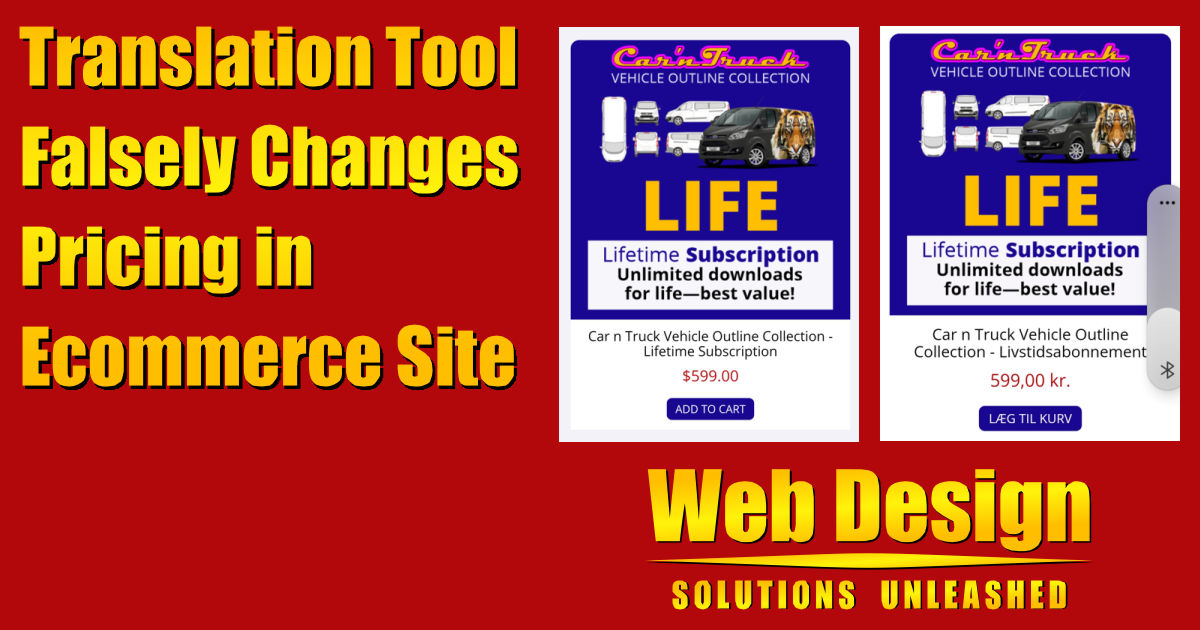
Having tools to translate between languages is extremely valuable and I use these tools nearly every single day. They may not get every word perfect, but they get it close enough in almost all cases that someone can understand the meaning of the words. Today I want to share the story of a translation tool that also changed currency which meant the price displayed by the translation was much different than the actual pricing.
Let me first describe the site that was translated. It happened on the Vehicle Templates Unleashed site and the pricing in question is displayed in the Purchase Subscription section of the Purchase Vehicle Templates page. The site is designed only in English and all pricing is always defined in US dollars, both for display purchases and the amounts charged when a purchase is made.
Below is a screenshot of one specific product as it appears on the site as designed.

After someone in Denmark purchased the product, they reached out with concern because the price they saw was in Danish Krone and yet they were charged in US dollars. This was very confusing since all pricing on the site has always been only in US dollars. The purchaser sent a screenshot of the product as they saw it on their phone and you’ll see that below.

As expected, the words have been translated from English to Danish. Since I don’t know Danish, I can only assume the words are a good translation. The concerning part is what the translation tool did to the pricing. It removed the dollar sign ($) preceding the price and replaced it with “kr” after the price. It also changed the way the numbers display from the standard in the United State of a period between dollars and cents to a comma which is common in Europe.
By making this change to currency, it drastically changed the pricing of the product for the viewer. To give you a rough idea, I’ve included a screenshot of the recent exchange rate between the US Dollar and the Danish Krone below. In short, the pricing for $599 US dollars appears to the viewer as less than $99 US dollars.
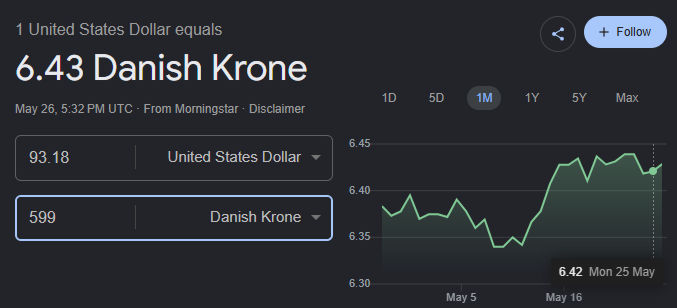
This is a major error made by the translation tool as it should never change the currency like this. If it truly wanted to change the currency, it should use current exchange rates and clearly state it is displaying an approximate price. Sadly, it did neither. Unfortunately I was never told what tool was used to translate the site including the incorrect change to pricing. Out of curiosity, I used the Google Translate feature built into the Chrome browser to translate the page to Danish and I saw the exact same error.
I then tried translating into other languages. When I chose French, it simply moved the dollar sign from before the price to after the price. When I chose German, it again changed the price using the € sign after the number. Lastly, I tried Spanish and it left the price exactly the same. In case the problem may have only been with the Ecommerce software used on this site, I tested other sites using different Ecommerce software. They had the same issue.
In talking with other Web designers, one suggested that USD be added after each price. That is certainly easy to do in some locations on the site. But the prices displayed in the screenshots are controlled by Ecommerce software and it needs an option for adding the suffix. I did find a way to add USD as a prefix on the site in question above. It appears there are also ways to do this in other Ecommerce software, but the settings are buried deeply. Below you’ll see the English and Danish versions side by side after this change.

Hopefully someone involved with Google Translate will see this post and fix this egregious error. Pricing is something that should never be “translated” in this way. If it is “translated” it must take exchange rates into account and it must disclose that it is not displaying pricing as it appears natively on the site. Has Google forgotten their motto of “don’t be evil”?







0 Comments